Earlier this week, we asked a simple question:
If one of your vendors emailed you today with new wiring instructions, what would your team do before sending the money?
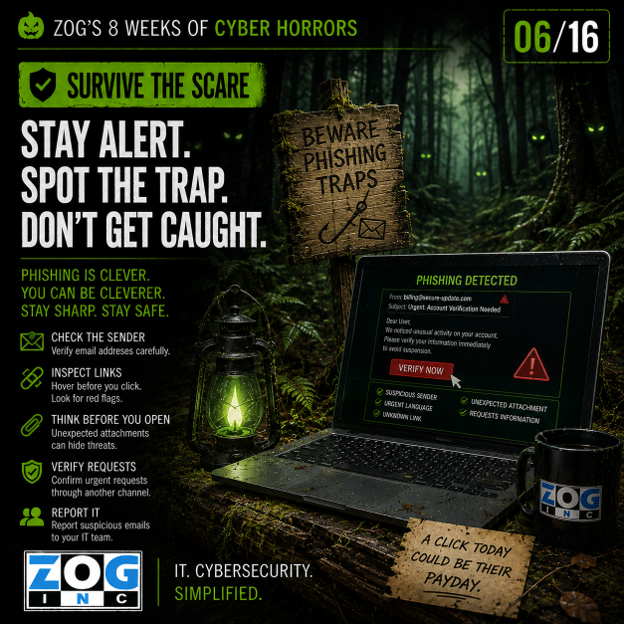
If the answer is simply, “We’d make the change,” your business may be wandering into The Phishing Forest.
The best phishing defense isn't teaching employees to distrust every email that arrives in their inbox.
It's teaching them to recognize the moments when they should stop, question and verify.
Because today's phishing attacks aren't always obvious. The email may look professional. The sender may appear familiar. The request may even make perfect sense.
That's exactly why your defenses need to go beyond looking for bad grammar and suspicious links.
Look at the Request, Not Just the Email
Employees are often taught to look for signs that an email is fake: misspellings, strange email addresses, unusual formatting or suspicious attachments.
Those are still worth watching for.
But employees should also evaluate what the sender is asking them to do.
Pay extra attention whenever a message involves:
- Money or payments
- Passwords or credentials
- Banking information
- Sensitive company or customer data
- Login links
- MFA requests
- Changes to direct deposit
- Changes to normal procedures
- Unusual urgency
The email doesn't have to look suspicious for the request to deserve additional verification.
That's an important distinction.
Verify Financial Changes Outside the Email
Go back to our vendor example.
You receive an email saying your vendor has changed banks and provides new wiring instructions.
Everything looks legitimate. What happens next?
Your organization should have a defined process requiring someone to independently verify the change before money moves.
Call the vendor using a phone number already stored in your records. Contact a known representative directly. Use an established approval process.
What you shouldn't do is reply to the suspicious email asking if the instructions are correct. And don't rely on the phone number conveniently provided in that same message. If an attacker controls the conversation, you're simply asking the attacker to verify their own fraud.
Use a communication channel you already trust.
Protect More Than Just Payments
Verification shouldn't stop with wire transfers.
Consider other requests that could create significant risk:
An employee emails HR asking to change their direct deposit information.
An executive asks someone to purchase gift cards.
A vendor requests sensitive customer information.
Someone from IT sends a link asking employees to “re-authenticate” their Microsoft 365 accounts.
A coworker sends an unexpected document and asks you to log in to view it.
Each request may have a perfectly legitimate explanation. But when the consequences of being wrong are significant, verification is worth the extra minute.
Make Reporting Easy
Even well-trained employees will encounter messages they're unsure about. That's a good thing—if they know what to do next. Employees need a simple, well-understood way to report suspicious emails or ask for help.
And just as importantly, they shouldn't be afraid they'll get in trouble for asking.
You want employees thinking:
“I'm not sure about this. I'm going to check.”
Not:
“I don't want to bother IT, so I'll just click it.”
Creating a culture where employees feel comfortable questioning unusual requests can be just as important as the security awareness training itself.
Use Layers of Protection
Employees shouldn't be your only phishing defense.
Technology should be working behind the scenes as well.
Email security can identify and block many malicious messages before they reach an inbox. Multi-factor authentication can make stolen passwords less useful. Endpoint security can help detect malicious activity. DNS and web filtering can help prevent users from reaching known malicious destinations.
And employee education helps catch what technology misses. The key word is layers.
No single cybersecurity control catches everything.
A strong phishing defense assumes that occasionally a malicious message will get through—and puts additional protections in place to prevent that email from becoming a successful attack.
Don't Forget About MFA Fatigue
Sometimes attackers already have a username and password.
Their next obstacle is multi-factor authentication.
An employee suddenly receives an MFA approval request they didn't initiate. Then another. And another.
The attacker may be hoping the employee eventually hits Approve just to make the notifications stop.
Employees should know:
If you didn't initiate the login, don't approve the request.
Unexpected MFA prompts should be treated as a warning that credentials may already be compromised and reported immediately.
Slow Down! Attackers love urgency.
“I need this before my meeting.”
“The payment has to go today.”
“Your account will be disabled.”
“Please take care of this immediately.”
Urgency is designed to move people from thinking to reacting.
Your defense can sometimes be remarkably simple:
Refuse to be rushed.
When money, credentials, sensitive information or an unusual request is involved, take the extra minute.
Look at the request. Verify it through another channel. Ask someone if you're unsure.
That brief interruption is exactly what the attacker doesn't want.
Give Employees Permission to Question the Boss
This is especially important for business leaders.
If an employee receives an unusual request that appears to come from the CEO, CFO or another executive, they need to know it's acceptable to verify it.
Leadership can reinforce this directly:
“If you receive an unusual financial or sensitive request from me, I want you to verify it—even if the message says it's urgent.”
That simple expectation removes some of the social pressure attackers depend on when impersonating executives.
The goal isn't to slow down the business. It's to make sure urgency doesn't override good judgment.
A Business Leader's Question
This week, ask your team:
“What should an employee do if they receive an email that looks legitimate but asks them to do something unusual?”
There should be an easy answer.
Employees should know how to verify the request, how to report the message and who to contact if they're unsure.
Because getting out of The Phishing Forest isn't about distrusting everything.
It's about knowing when to stop and check the map.
Survive the Scare
Look at the request. Verify high-risk changes. Make reporting easy. Use layers of security. And don't let urgency make the decision for you.
One email can lead your business into the Phishing Forest.
Sometimes, one extra minute of verification is all it takes to find your way back out.



Leave a Comment
Your email address will not be published. Required fields are marked *